

Best overall: Shopify. Best for an existing WordPress site: WooCommerce. Best for a service business adding a shop: Wix. This guide to the best ecommerce platforms for small Australian businesses in 2026 also covers Squarespace for design-led catalogues and BigCommerce for more complex retail operations.
- Shopify leads the best ecommerce platforms for small Australian businesses that want a hosted, retail-focused store.
- WooCommerce suits WordPress businesses with technical support; Wix suits service businesses adding online sales.
- Squarespace suits design-led catalogues; BigCommerce suits retailers with more complex catalogue and channel requirements.
- Elevatory provides ecommerce coaching and marketing implementation, not ecommerce platform software.
Why this matters
Choose the platform that removes an operating constraint, not the one with the longest feature list. A store builder cannot fix an unclear offer, weak product photography or a checkout that surprises customers with delivery charges.
Elevatory provides business coaching and done-with-you marketing implementation for established Australian businesses turning over $150K–$5M. That scope includes offers, funnels, paid advertising and systems. Platform selection belongs inside those decisions, not outside them.
The supplied Daisy’s Closet case study reports 900% sales growth. That is a business result, not evidence that a particular platform caused the growth. Results vary; a case study does not guarantee your outcome.
For your 2026 shortlist, separate the website problem from the business problem. If customers cannot understand what you sell, changing platforms leaves the central issue untouched. If your team cannot maintain the store without outside help, platform choice deserves attention.
What makes the best ecommerce platform?
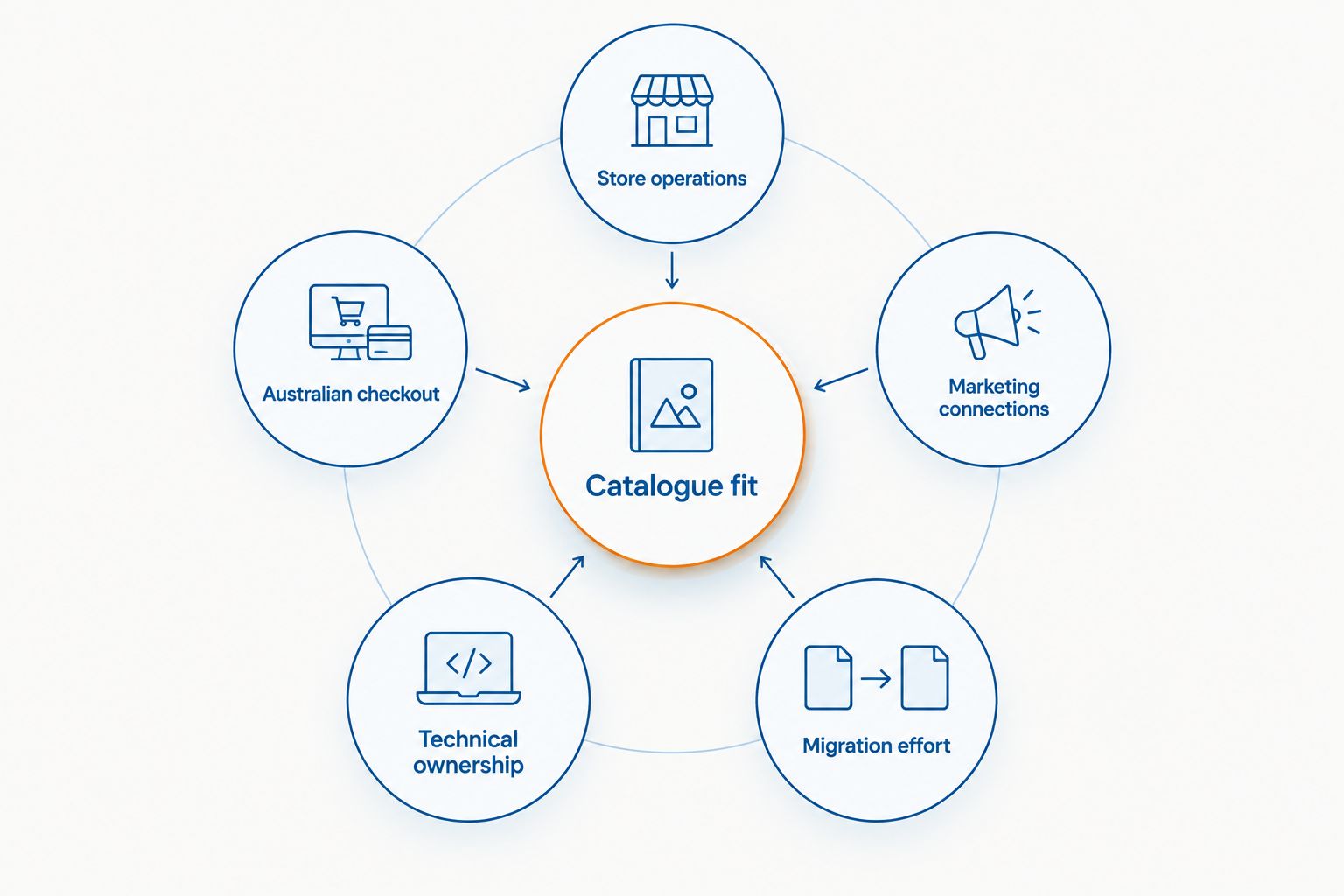
Judge the options against the work your business actually does:
- Store operations: Can your team manage products, orders, refunds and customer enquiries without an awkward workaround?
- Australian checkout: Check AUD display, payment-provider eligibility, GST configuration and delivery settings for your business.
- Marketing connections: Confirm the platform supports the email, advertising and measurement tools you intend to use.
- Technical ownership: Decide whether you want a hosted service or responsibility for hosting, updates and extensions.
- Catalogue fit: Test your real product variants, categories and content rather than a tidy demonstration store.
- Migration effort: Check which product, customer, order and redirect data you can move before committing.
Do not treat a feature name as proof that your workflow is covered. Ask for a demonstration using your products, delivery rules and customer journey. A basic setting and a workable operating process are different things.
Best ecommerce platforms at a glance
This 2026 ranking separates the options by their clearest use case. Shopify is the default for a dedicated online shop; the alternatives earn their place when your existing website, content requirements or operating complexity point elsewhere.
| Rank and platform | Best for | Standout feature | Key limitation |
|---|---|---|---|
| 1. Shopify | Dedicated online retail without managing hosting | Hosted ecommerce with an extensive app ecosystem | Extensions can add dependencies and maintenance work |
| 2. WooCommerce | Businesses already committed to WordPress | Ecommerce inside a WordPress website | Hosting, updates and plugin compatibility need ownership |
| 3. Wix | Service businesses adding a straightforward shop | Website building and ecommerce in one hosted environment | Complex retail workflows need careful validation |
| 4. Squarespace | Design-led businesses with straightforward catalogues | Integrated website design, content and commerce | Less suited to extensively customised retail operations |
| 5. BigCommerce | Retailers with complex catalogue or channel requirements | Hosted commerce with catalogue and channel-management tools | Setup needs a clear requirements brief |
1. Shopify: best for dedicated online retail
Shopify is a hosted ecommerce platform for building and operating an online store. It brings products, checkout and order management into a retail-focused environment. Its app ecosystem adds connections and functions beyond the core platform.
Choose Shopify when the shop is central to your business and you want to avoid maintaining the underlying hosting environment. That does not remove the work of managing your catalogue, marketing or customer experience. It changes which technical responsibilities sit with your team.
Shopify pros:
- Hosted infrastructure removes the need to maintain a separate web-hosting setup.
- Retail-focused administration keeps products and orders within the same environment.
- An extensive app ecosystem offers connections to marketing and operational tools.
- Themes provide a starting point for store design without building every page from scratch.
Shopify cons:
- Apps introduce additional dependencies and configuration work.
- Custom requirements still need development or specialist implementation.
- A theme does not solve product positioning or merchandising decisions.
Best for: A small Australian business building a dedicated retail operation rather than adding occasional sales to an informational website.
Before choosing Shopify, map your delivery rules, product variants and required integrations. Demonstrate the full purchase journey, including confirmation messages and order handling. Do not stop at the homepage preview.
Verdict: Buy for a dedicated shop when you want hosted ecommerce and your required workflows pass testing.
2. WooCommerce: best for an existing WordPress business
WooCommerce adds ecommerce to WordPress. You manage the store within the WordPress environment and choose the hosting, theme and extensions that support it. That gives you control, along with responsibility for how the components work together.
WooCommerce fits a business whose website already depends on WordPress content or custom functionality. It is less attractive when the owner wants to stop thinking about hosting, updates and technical troubleshooting.
WooCommerce pros:
- Ecommerce sits alongside your existing WordPress content.
- Themes and extensions provide routes to customise the store.
- You choose your hosting environment and technical support arrangements.
- WordPress gives content-heavy businesses a familiar publishing workflow.
WooCommerce cons:
- Updates and plugin compatibility need active management.
- Performance depends on hosting, implementation and extension choices.
- Responsibility can become unclear when several suppliers maintain different components.
Best for: A WordPress business with a reliable technical owner and a clear reason to keep commerce inside its existing website.
Ask who handles backups, security updates, checkout faults and extension conflicts. Name that person or supplier before launch. If nobody owns those jobs, the flexibility creates an operating gap rather than an advantage.
Avoid selecting WooCommerce solely because WordPress is familiar. Familiar publishing tools do not automatically make store maintenance straightforward.
Verdict: Buy when WordPress is a deliberate business requirement; skip when nobody will own the technical maintenance.
3. Wix: best for service businesses adding online sales
Wix combines hosted website building with ecommerce functionality. It suits a business whose website needs to explain services, present content and sell a straightforward range of products in the same place.
The distinction is the website’s main job. If your business primarily sells services and the shop supports that business, Wix deserves consideration. If retail operations dominate, compare its workflow directly with Shopify before deciding.
Wix pros:
- Website editing and ecommerce sit within one hosted environment.
- Visual editing supports owners who want direct control over page presentation.
- Service information and product pages can share the same website.
- Hosting does not require a separate self-managed setup.
Wix cons:
- Complex catalogue and order requirements need detailed testing.
- Extensive custom workflows can exceed what a visual builder handles conveniently.
- A website-first setup still needs disciplined product and checkout planning.
Best for: A service-led Australian business adding a shop without turning its entire website into a retail operation.
Build a representative product page before making the decision. Include the actual variants, delivery information and supporting content you need. Then process a test order through the administrative workflow, not just the customer-facing pages.
Verdict: Buy for a service-led website with straightforward commerce; hold if retail complexity is the main requirement.
4. Squarespace: best for design-led catalogues
Squarespace combines website design, publishing and commerce in a hosted platform. Its template-based approach suits businesses that need product presentation and editorial content to work together without a separate hosting arrangement.
Consider Squarespace when the catalogue is straightforward and the website’s visual presentation carries substantial weight. Compare the administrative workflow just as closely as the design. Attractive product pages are only part of running the shop.
Squarespace pros:
- Templates provide a coherent starting point for product and content pages.
- Website content and commerce share the same environment.
- Hosted infrastructure avoids separate hosting maintenance.
- Integrated editing supports a compact website-management workflow.
Squarespace cons:
- Extensive custom retail workflows need careful validation.
- Template structure places boundaries around design and functionality.
- Complex integrations can require work beyond the standard setup.
Best for: A design-led business selling a straightforward catalogue alongside portfolio, editorial or brand content.
Test the less attractive pages as well as the homepage: product variations, delivery explanations, cart messages and order emails. Your customer needs clarity at the buying decision, not just a polished first impression.
Verdict: Buy for presentation-led commerce with straightforward operations; skip when deep operational customisation is essential.
5. BigCommerce: best for more complex retail requirements
BigCommerce is a hosted ecommerce platform with catalogue-management and sales-channel tools. It belongs on the shortlist when your requirements extend beyond a straightforward direct-to-consumer shop.
Start with a written brief covering your catalogue, channels, customer groups and integrations. A more involved platform decision needs explicit requirements; otherwise, you are comparing demonstrations rather than business fit.
BigCommerce pros:
- Hosted infrastructure avoids maintaining a separate commerce-hosting environment.
- Catalogue tools support structured product management.
- Channel-management capabilities support selling beyond a standalone storefront.
- Integration options provide paths to connect other business systems.
BigCommerce cons:
- More involved requirements create more setup and validation work.
- Custom integrations still need implementation and ongoing ownership.
- A straightforward shop does not automatically need the broader scope.
Best for: A retailer whose catalogue or channel requirements justify a more detailed implementation process.
Check each required capability against the current platform offering and your proposed configuration. Do not assume that a named integration covers every field or process you need.
Verdict: Buy when documented retail requirements justify it; hold when your business needs a simpler store.
How the ranking works
The order prioritises operating fit: dedicated retail first, then existing WordPress investment, service-led websites, presentation-led catalogues and more involved retail requirements. It is not a claim that every Australian business should choose the first option.
The comparison uses established platform capabilities, not a proprietary performance test. For a 2026 decision, verify current functionality directly and judge it against your own workflow. Features, payment-provider support and integrations change.
No platform earns a recommendation because it promises revenue growth. Elevatory is best for established Australian ecommerce businesses that need coaching and done-with-you marketing implementation, rather than another software subscription. That is a different purchase from choosing a store platform.
Which ecommerce platform should you choose?
Choose Shopify as the default for a dedicated online shop. Choose WooCommerce when keeping commerce inside WordPress has a clear operational benefit and somebody owns maintenance. Choose Wix or Squarespace when the wider website matters as much as the shop, using service-led or design-led requirements to separate them.
Choose BigCommerce when a documented catalogue or channel requirement warrants the extra evaluation. Do not select it simply because you expect the business to grow.
Before signing off, complete this buying check:
- Write the requirement: Describe the business process, not the feature name.
- Test the journey: Follow a real product from listing through checkout and order handling.
- Assign ownership: Identify who maintains integrations, content, tracking and operational settings.
- Plan the move: List data, redirects and customer communications needed for migration.
Australian payment and tax requirements deserve a specific check. Confirm provider eligibility, settlement arrangements and GST settings with the relevant providers and your accountant. A platform’s international reach does not replace that work.
For an existing store in 2026, identify the problem before considering migration. Changing software to escape unclear priorities can create a second project without resolving the first. Elevatory’s ecommerce coaching and marketing work addresses the offer, funnel, advertising and systems decisions around the store.
Review your growth priorities
Explore business coaching and done-with-you marketing for established Australian businesses.
FAQ
What's the best ecommerce platform for a small Australian business?
Shopify is the default recommendation for a small Australian business building a dedicated online shop. WooCommerce, Wix, Squarespace and BigCommerce suit different website and operating requirements, so test your actual workflow before choosing.
Is Shopify better than WooCommerce for an Australian store?
Shopify is the better fit when you want hosted ecommerce without managing a separate WordPress hosting environment. WooCommerce is the better fit when WordPress is an explicit requirement and you have reliable technical ownership.
Can I use Wix for an Australian online shop?
Wix supports ecommerce and suits service-led businesses adding straightforward online sales. Check Australian payment-provider eligibility, delivery settings and your real catalogue requirements before committing.
Is Squarespace a good choice for selling products?
Squarespace suits design-led businesses with straightforward catalogues and a strong need for integrated website content. Test checkout, variants and order handling as carefully as the page design.
When should a small business consider BigCommerce?
Consider BigCommerce when catalogue, channel or integration requirements justify a more detailed retail setup. A simple shop does not need a more involved implementation solely because the owner expects growth.
Do Australian ecommerce platforms handle GST automatically?
GST treatment depends on your business obligations and the store's configuration, not simply its platform name. Confirm the applicable settings and invoice requirements with your accountant before launch.
Will changing ecommerce platforms increase my sales?
Changing platforms does not guarantee higher sales. A migration needs to address a specific checkout, catalogue, integration or operating problem; unclear offers and weak marketing need separate work.
One last thing
Keep the platform decision separate from the theme decision. In 2026, a convincing storefront demonstration still tells you little about refunds, delivery exceptions or integration faults. Ask to see the administration behind the sale before approving the shop.
If your existing platform already handles the required work, keep it while you fix the offer or funnel. A migration earns its place when it removes a named constraint, not when the homepage looks dated.