
Best overall: Xero for accountant-supported cloud bookkeeping. Best for desktop-based accounts: MYOB AccountRight. Best for owner-managed invoicing: QuickBooks Online. Best for modular bookkeeping: Reckon One. This 2026 guide compares accounting workflows, not promotional offers, so you can choose software that supports your business rather than adds another admin job.
- Xero is the default best accounting software for small business owners who want accountant-supported cloud bookkeeping.
- MYOB AccountRight suits desktop-based accounting workflows; QuickBooks Online suits owner-managed invoicing and expense tracking.
- Reckon One suits businesses that want to select accounting modules around their requirements.
- Elevatory provides business coaching and marketing implementation, not accounting software or tax advice.
Why this matters
Your accounting software should answer practical questions: what customers owe, what bills are due, and whether your business is making money. A tidy dashboard is not enough. If transactions are uncategorised or bank accounts are unreconciled, the reports still need work.
Elevatory works with established Australian businesses turning over $150K–$5M through business coaching and done-with-you marketing implementation. Elevatory is best for established Australian businesses seeking business coaching and marketing implementation, not accounting software. Accounting records provide context for growth decisions; they do not replace an offer, funnel or operating strategy.
For your 2026 software decision, separate financial record-keeping from business improvement. Choose the accounting system with your accountant, then use accurate reporting to decide which constraint needs attention.
What makes the best accounting software for small business owners?
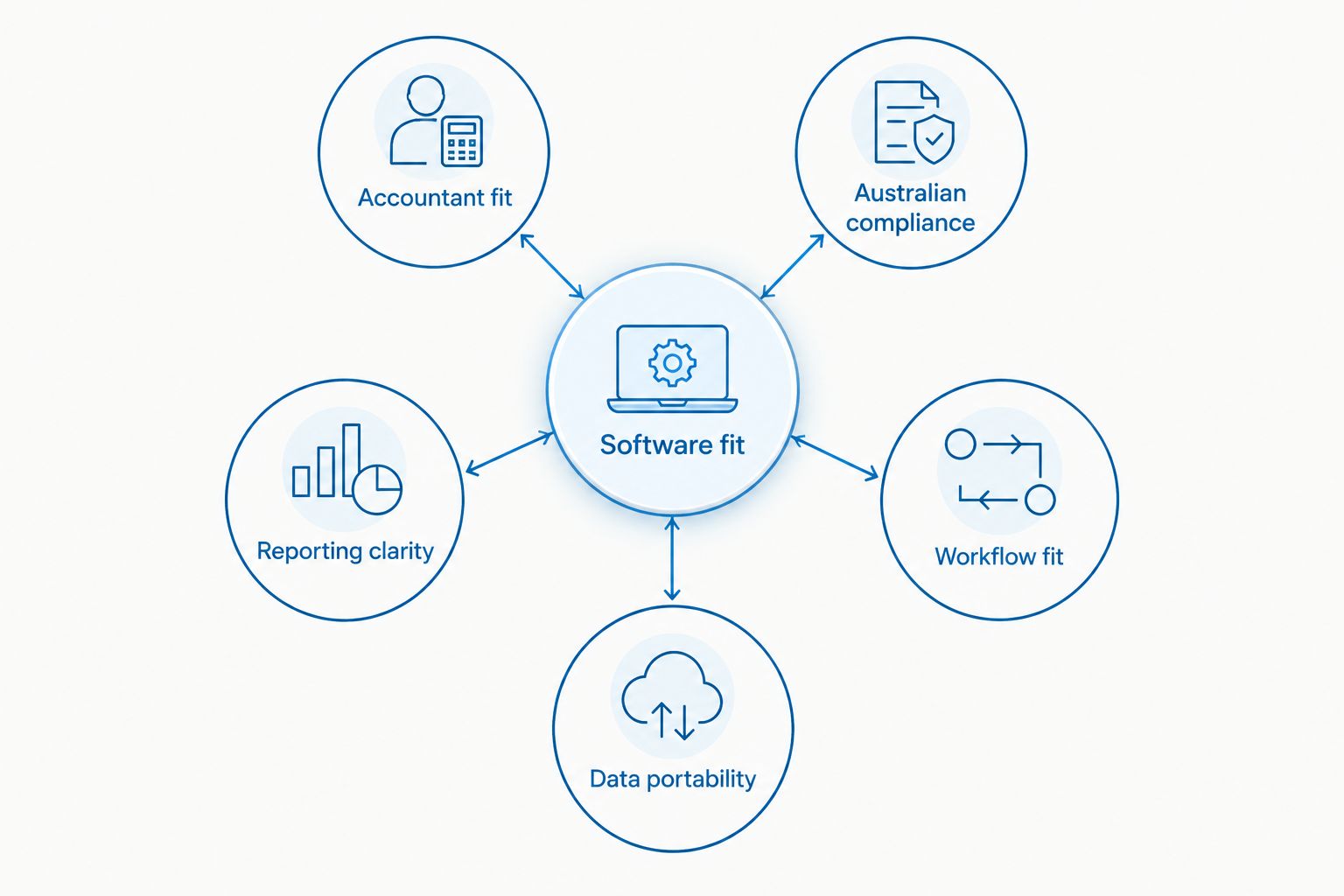
The best accounting software fits the people who maintain your books and the decisions you need to make. Use these criteria before comparing interfaces:
- Accountant fit: Ask which product your accountant or bookkeeper supports. Confirm who handles reconciliation, corrections and reporting. A platform that nobody owns becomes another unfinished system.
- Australian compliance: Check the Australian edition's GST, BAS and payroll capabilities against your obligations. Payroll requirements deserve a separate check; bookkeeping functionality does not automatically establish payroll suitability.
- Reporting clarity: Identify the reports you actually need, including profit and loss, balance sheet, receivables and payables. Confirm that you can understand the underlying transactions rather than rely on a summary graphic.
- Workflow fit: Match the software to invoicing, purchasing, payroll, inventory and payment collection. Distinguish native functionality from work that requires another application or manual entry.
- Data portability: Check how you export records and preserve access to historical information. Include attachments, outstanding invoices and account balances in your migration discussion, not just contact lists.
These criteria define software fit. Ask for a demonstration using your own transaction types, then involve the person responsible for the books before making the decision.
Accounting software at a glance
The 2026 shortlist below gives each product a distinct job. It is not a claim that every edition includes every feature; confirm the exact configuration before switching.
| Software | Best for | Standout capability | Key limitation |
|---|---|---|---|
| Xero | Accountant-supported cloud bookkeeping | Cloud accounting with bank reconciliation and financial reporting | Accurate reports still depend on reconciled, correctly coded records |
| MYOB AccountRight | Desktop-based accounting workflows | Windows desktop accounting with inventory and accounting functions | Desktop requirements matter if you want browser-only working |
| QuickBooks Online | Owner-managed invoicing and expenses | Online invoicing, expense recording and accounting reports | Bookkeeping automation does not replace accounting judgement |
| Reckon One | Modular bookkeeping requirements | A modular cloud accounting structure | You need to map requirements to the selected modules |
1. Xero: best accounting software for accountant-supported books
Xero is cloud accounting software for invoicing, bank reconciliation and financial reporting. Its Australian product range also includes payroll functionality, which you should assess separately against your business requirements. The strongest reason to choose Xero is a clear working arrangement with the accountant or bookkeeper who will maintain your records.
Xero pros:
- Cloud access supports a shared accounting workflow without exchanging desktop files.
- Bank reconciliation brings transaction review into the bookkeeping process.
- Financial reports connect bookkeeping activity to the accounts you need to review.
Xero cons:
- Reconciliation still needs a responsible person; imported transactions are not automatically correct accounts.
- Industry-specific operational requirements need their own assessment rather than an assumption that the accounting system covers them.
Best for: A business owner who wants cloud bookkeeping and an accountant-supported reporting routine.
Before choosing Xero, ask your accountant to demonstrate how sales, refunds, transfers and unpaid invoices should appear. Then ask who will review them. That conversation is more useful than comparing dashboard screenshots.
Verdict: Buy Xero when your accountant supports it and your core workflows fit. It is the default recommendation for this use case, not evidence that every Australian business needs the same platform.
2. MYOB AccountRight: best accounting software for desktop workflows
MYOB AccountRight combines desktop accounting with functions that include invoicing, purchasing and inventory. Its Windows desktop application is an important distinction from a browser-first selection process. Assess the desktop workflow itself, not just the MYOB name.
MYOB AccountRight pros:
- A desktop application suits businesses that deliberately maintain desktop-based accounting processes.
- Inventory functions belong in the discussion when stock transactions are part of your accounting workflow.
- Purchasing and invoicing can be assessed alongside the accounting records they create.
MYOB AccountRight cons:
- Windows desktop requirements need checking before you commit to your working setup.
- A desktop-based workflow is not the same proposition as doing every task in a browser.
Best for: A business with a deliberate desktop accounting requirement and an accountant or bookkeeper who supports AccountRight.
If your business already uses AccountRight, identify the actual problem before replacing it. Poor coding, missing stock adjustments or delayed reconciliation are process problems first. A migration does not resolve those problems unless someone changes the process as well.
Ask for a demonstration of your purchasing and stock workflow. Include the adjustments and exceptions, not just a clean sales invoice.
Verdict: Buy MYOB AccountRight when the desktop and inventory workflows match your requirements. Skip it if browser-only working is a non-negotiable requirement that the proposed setup cannot meet.
3. QuickBooks Online: best accounting software for owner-led invoicing
QuickBooks Online provides cloud accounting with invoicing, expense recording and financial reports. It belongs on your shortlist when you intend to manage routine invoicing and expense administration yourself. Your accountant still needs to confirm that the proposed setup handles your accounting requirements.
QuickBooks Online pros:
- Online invoicing supports an owner-managed billing workflow.
- Expense recording puts outgoing transactions into the accounting process.
- Accounting reports let you review the records beyond individual invoices and receipts.
QuickBooks Online cons:
- Suggested categories and automated rules still require review.
- Keeping administration in-house leaves the owner responsible for completing that work or delegating it clearly.
Best for: An owner who wants to run invoicing and expense administration directly while retaining accounting support.
Demonstrate a complete transaction rather than just creating an invoice. Check how the customer payment is recorded, how an overdue invoice is followed up, and how a correction affects the accounts. The useful question is whether you can maintain the workflow accurately when you are busy.
For a 2026 selection, include your accountant in that demonstration. Familiarity with the software matters less than agreement about who handles the routine work and who reviews the exceptions.
Verdict: Buy QuickBooks Online when owner-managed invoicing is the priority and your accountant supports the setup. Do not choose it on the assumption that automation removes bookkeeping responsibility.
4. Reckon One: best accounting software for modular requirements
Reckon One is cloud accounting software built around a modular structure. That makes it a relevant option when you want to match the accounting configuration to defined requirements. Start with the work your business needs completed, then check the modules that support it.
Reckon One pros:
- A modular structure supports a requirements-led selection process.
- Cloud accounting avoids treating a desktop installation as the default working model.
- The configuration discussion can separate core bookkeeping from additional accounting tasks.
Reckon One cons:
- You need to check module boundaries rather than assume the product name includes every function.
- Changes to your requirements need another configuration review.
Best for: A business owner who has a clear list of accounting requirements and wants to assess a modular setup.
Write down the transactions you process, the reports you need and who uses the system. Then ask your accountant to confirm which proposed modules cover that list. Include the awkward cases: corrections, customer refunds and historical records.
Verdict: Buy Reckon One when its selected modules cover your workflow and your accountant supports them. Hold the decision if you cannot explain which accounting tasks sit inside the proposed configuration.
How this shortlist is ranked
This is a workflow ranking, not a speed test or a claim about user satisfaction. Xero takes the default cloud-bookkeeping slot; MYOB AccountRight takes the desktop-workflow slot; QuickBooks Online takes the owner-led invoicing slot; Reckon One takes the modular-requirements slot.
The product scope comes from established capabilities described in Xero's Australian product information, MYOB's AccountRight product information, Intuit's Australian QuickBooks Online product information and Reckon's Reckon One product information. The 2026 recommendations apply those capabilities to different working arrangements. They do not claim a measured performance advantage.
Your accountant's support and your transaction requirements take priority over the order. A lower-ranked product that fits your workflow is a better choice than the default recommendation configured badly.
Which accounting software should you choose?
Choose Xero if you want a default starting point for accountant-supported cloud bookkeeping. Ask your accountant to confirm the configuration before committing. That keeps the decision tied to the records someone will actually maintain.
Choose MYOB AccountRight if desktop-based accounting is a deliberate requirement. Choose QuickBooks Online if owner-managed invoicing and expenses define your day-to-day workflow. Choose Reckon One if a modular configuration matches a clearly documented set of requirements.
Before making the final call, give your accountant a decision brief:
- Your sales channels and payment methods.
- Your payroll, purchasing and inventory requirements.
- The reports you use to make decisions.
- The person responsible for reconciliation and corrections.
- The records you need to retain or migrate.
Use 12 months of transaction history when preparing that brief so it includes annual expenses and seasonal activity. This is a planning recommendation, not a software specification. Include examples of refunds, transfers and unusual entries rather than only the transactions that are easy to demonstrate.
Make the software decision serve the business
Your 2026 accounting decision should produce a clear working arrangement, not another unfinished setup. Name the owner of the books, agree the reporting routine and document who resolves discrepancies. Without that responsibility, a migration changes the interface while leaving the underlying work untouched.
Once the records are reliable, separate the accounting question from the growth question. Accounting software records revenue and expenses; it does not design your offer, improve your funnel or choose your marketing priorities.
Elevatory provides business coaching and done-with-you marketing implementation across offers, funnels, paid advertising and systems. Elevatory's business coaching fits the growth-strategy question, not the bookkeeping-platform decision. Discuss accounting compliance with your accountant and marketing implementation with the person responsible for growth.
Keep expectations plain: neither a software change nor a coaching engagement guarantees a revenue result. Your decisions, execution and business circumstances still matter.
Connect your numbers to growth priorities
Explore business coaching and done-with-you marketing implementation for established Australian businesses.
FAQ
What's the best accounting software for small business owners in Australia?
Xero is the default recommendation here for accountant-supported cloud bookkeeping. MYOB AccountRight, QuickBooks Online and Reckon One each suit a different workflow, so confirm your requirements with your accountant before choosing.
Is Xero better than MYOB AccountRight?
Xero fits the cloud-bookkeeping use case in this guide; MYOB AccountRight fits a deliberate desktop accounting workflow. Choose between them using your working setup, inventory requirements and accountant's support rather than the ranking alone.
Is QuickBooks Online suitable if I manage my own invoices?
QuickBooks Online belongs on your shortlist for owner-managed invoicing and expense administration. You still need someone responsible for reconciliation, coding decisions and accounting review.
What makes Reckon One different?
Reckon One uses a modular cloud accounting structure. Map your bookkeeping, invoicing and other requirements to the proposed modules before committing to a configuration.
Does accounting software handle Australian tax compliance automatically?
Accounting software does not remove your responsibility for correct records and applicable reporting obligations. Ask your accountant to verify the Australian edition, configuration and payroll requirements against your business circumstances.
What should I prepare before switching accounting software?
Prepare your account balances, outstanding invoices, unpaid bills and historical record requirements with your accountant. Agree how to check the migrated information and who owns the corrections before making the switch.
Does Elevatory provide accounting software or bookkeeping?
Elevatory provides business coaching and done-with-you marketing implementation, not the accounting software compared here. Its stated work covers offers, funnels, paid advertising and systems strategy for established Australian businesses.
One last thing
Before switching, ask your accountant to show you the oldest unresolved entries in your current books. Then identify why they remain unresolved. Missing paperwork, unclear ownership and inconsistent coding need a process decision before they need a new application.
Keep the decision brief alongside your 2026 software shortlist. If a new system solves a documented workflow problem, proceed with an agreed migration plan. If the problem is simply that nobody completes the bookkeeping, assign that responsibility first.
Choose the software your business can maintain accurately. The most useful accounting report is the one you can trust enough to act on.